

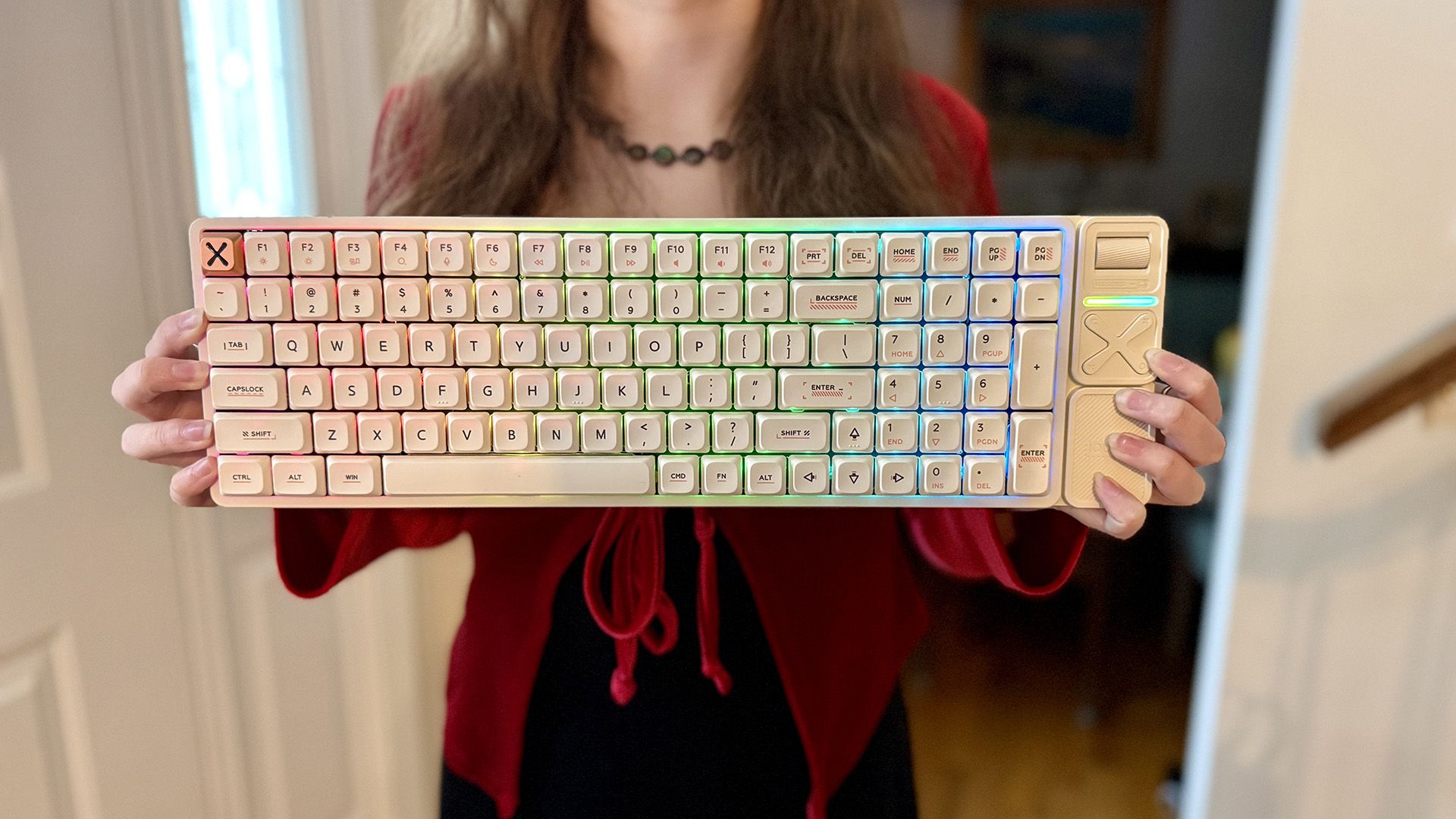
The pre-assembled low-profile mechanical keyboard market used to be a niche dominated by a few established players like Keychron and Logitech, but IQUNIX has crashed the party. The IQUNIX Magi96 Pro is a premium, CNC-machined aluminum heavyweight that redefines what a slim keyboard can feel like. Setting its sights squarely on competitors like the NuPhy Air96 and Keychron K Max series, it brings a level of luxury, weight, and acoustic tuning that’s rare in the low-profile space.
Price and what’s included
The IQUNIX Magi96 Pro is available direct from IQUNIX or Amazon for a regular retail price of $209.99 ($179.00 direct), but is often on sale for less. In the box you get the pre-assembled keyboard, premium USB-C to USB-A cable, female USB-C to female USB-A adapter, 2.4GHz USB-A receiver that sits behind a magnetic cover on the corner of the keyboard, keycap and switch puller, carrying case, 10 extra keycaps, two silicone switch blockers (aka, plate plugs or socket covers), a sticker, and paperwork. While more expensive than some other low-profile keyboards like the NuPhy Air96, the Magi96 Pro is undeniably a premium unboxing experience.

I’m specifically reviewing the Creamy / Ochre White (off white) ANSI (US) version of the keyboard, but it’s also available in Black / Shadow Black and ISO models.

Features and design: A CNC-machined marvel
The Magi96 Pro lets you connect via wired USB-C cable, a 1000Hz 2.4GHz wireless receiver, or Bluetooth, the latter of which supports up to three different devices. Pressing FN plus an appropriate key, like 4, for 2.4GHz mode, lets you quickly switch between modes.

Since I’m using this keyboard primarily on a Windows 11 desktop, I replaced the left-side wide OPT and CMD keys with the included wide ALT and WIN (Windows) keys, respectively. There’s a second ALT key to replace the second OPT key, but no additional WIN key, so I left that as CMD. I also replaced the ESC key with the included bronze X.

Naturally, you’re going to want to pull the keycaps using the keycap puller from top to bottom, rather than left to right, so you don’t pull the switch out with the keycap. It’s not a big deal if you don’t as they’re hot-swappable, but it’s something to note when pulling keycaps since the custom Kailh Gold Red two pin switches can easily bend if you’re not careful.

The keycaps are not shine-through, so you only see the RGB lighting around the opaque keycaps, referred to as halo effect or edge lighting. As such, the lighting effects are subdued at best.
On the plus side, the keycaps are a high-quality PBT plastic with an anti-oil coating, resulting in a low chance of developing a greasy shine over time. I also like the slight grip the keytops have.
One of the things that makes this a Pro keyboard is the aluminum volume wheel (roller) and four point buttons. Each point of the X controls a different function by default, with, for instance, the lower left button being to Play/Pause media.

One of the first things you’re likely to notice about the Magi96 Pro is how heavy it is thanks to the lack of plastic found in many other low-profile keyboards. At over 2lbs 13oz, you really feel the CNC-machined aluminum. It feels incredibly solid and eliminates any potential for flex.
Even with the tenkey (number pad), media keys, and wireless USB dongle storage, the keyboard is only 16-inches wide. That’s still not the best for placing the keyboard as close as possible to your mouse for gaming, but it’s a lot better than typically much wider keyboards with those types of features.
As is usual for a keyboard of this type, you have to use VIA software and download a special JSON file from the IQUNIX website. I’d much prefer first party software in this case, as I had quite the time getting everything to connect properly, thanks in no small part to the documentation only being translated on a fairly basic level. In any case, just remember that you need to download the correct JSON file, navigate to the VIA web app, go to Settings to turn on the Design tab, then Load the JSON file. As long as your keyboard is connected via a wired USB connection and you properly authorize the device, you should have access to everything you need to configure most of what you want.
Performance: Creamy, quiet, and linear
What everyone wants to know with a keyboard of this type is how the keys sound. A video follows, but I can describe it as a nice and smooth typing experience, with a creamy, buttery-smooth sound. It’s the type of keyboard you can use almost anywhere without too much risk of disturbing someone.
I had a good overall typing experience, but, thanks to the compressed 96% layout and having so many extras, some keys are in the “wrong” places, creating a learning curve. It’s not a deal-breaker by any means, but it’s something to keep in mind when you’re doing anything but entering text.
While I found the keyboard comfortable, I’m still disappointed there are no adjustable feet, so you’re stuck with the one angle.

Thanks to the low-profile keys and switches, this is a good gaming keyboard in terms of general responsiveness, but the tenkey does create some extra width. There are still dedicated gaming keyboards, like the Logitech G Pro X, that I prefer to use when playing competitive shooters because of their adjustable actuation and rapid trigger modes, but the Magi96 Pro is very good for something not designed primarily for gaming.

Without the RGB lighting – something I found underwhelming anyway – you can get up to 500 hours of battery life wirelessly. With RGB on, that drops to around 14 hours at best.
On a side note, my Magi96 Pro fell off one of my standing desks and took a chunk out of my wood floor in my office. The keyboard itself didn’t even have a scratch and continued to work perfectly. That to me says a lot about the build quality, which again, is reflected in the overall premium-feeling typing experience.
Should you buy the IQUNIX Magi96 Pro keyboard?
By just about any definition, the IQUNIX Magi96 Pro is a true keyboard enthusiast’s package when said keyboard enthusiast doesn’t want to build their own. This is particularly true because of its relatively unique low-profile nature. I’ve used, and enjoyed other low profile keyboards, but this is definitely a whole other level in terms of overall quality.
Of course, the Magi96 Pro isn’t perfect. Some of the keys are in odd places, there’s no adjustable typing angle, and the VIA software is a bear to get a handle on. Still, if you want a heavy duty, low-profile keyboard that actually has a tenkey, this makes a great choice, particularly thanks to the silky smooth, and relatively quiet, key action.


 Your total news and information resource for all things Science, Technology, Engineering / Mathematics, Art, and Medicine / Health.
Leave a Comment