

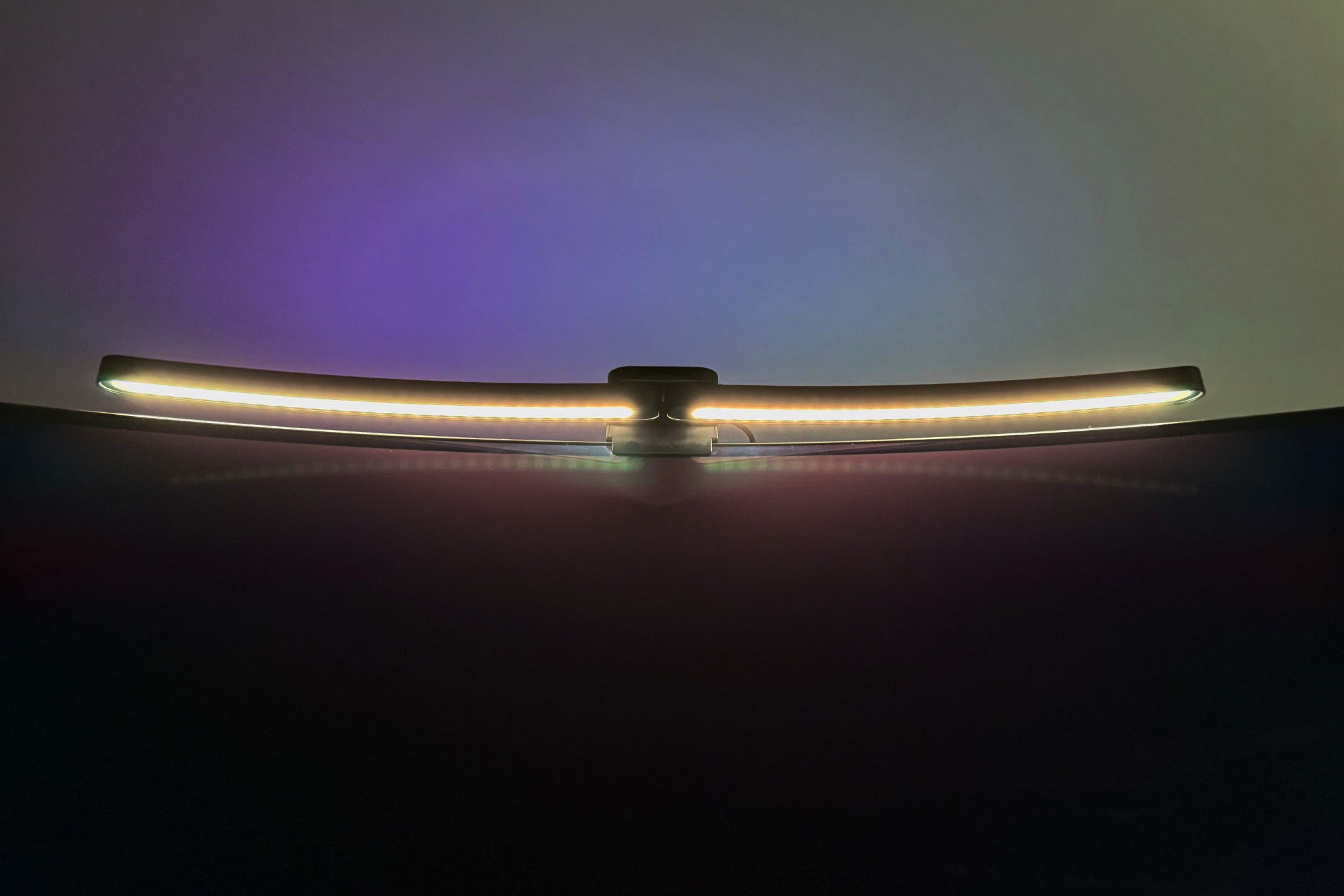
Finding a monitor light bar that properly accommodates the aggressive sweep of an ultrawide curved display can be an exercise in frustration. Standard straight bars can cast unwanted glare on the edges of the screen or sit awkwardly on the bezel. Enter the Quntis Monitor Light Bar for Curved Displays, which tackles this problem head-on with a clever ScreenLinear foldable dual-bar design. Combining eye-care-focused front illumination with a vibrant RGB backlight, it aims to be a budget-friendly lighting solution for late-night productivity and immersive gaming sessions alike.
Price and what’s included
The Quntis Curved Monitor Light Bar, aka Foldable Arc Eye-Care Light, is available direct from Quntis or Amazon for as low as $59.99 on sale. In the box you get the light bar, USB-C to USB-A cable, 5V/2A USB-A AC power adapter, 2.4GHz wireless control puck, three AAA batteries for the control puck, and paperwork.

Features and design: Wide and accessible
The standout feature of this light bar is its hinged design, which allows the two halves to angle independently up to a width of 25 total inches, and conform to monitors with sweeping curvatures spanning 34 inches and beyond (1000R to 3000R). It can be used on regular flat monitors as well. A heavy triple-fold clip equipped with anti-slip silicone mounts securely to screens up to 3.54 inches thick. Under the hood, it features a 45-degree asymmetrical optical design, ensuring that the bright front light hits your keyboard and workspace rather than your screen or eyes.

You get an impressive Ra98 Color Rendering Index (CRI) and IEC-certified anti-blue light protection, helping to alleviate visual fatigue during long coding, writing, or gaming sessions. On the aesthetic front, the top of the bar features 15 flowing RGB backlight modes that project upwards and backwards to create an ambient glow. A built-in light sensor can also automatically adjust the front brightness to match your room’s ambient conditions.
Since there’s no app or computer interface, you can simply plug the USB-C to USB-A cable into the included 5V/2A USB-A AC power adapter, or anything equivalent, and start using the light. Of course, you’ll also need to insert the included AAA batteries into the wireless control puck, which should last several months of regular usage.
Performance: Power forward
Usage is as straightforward as it gets. The wireless control puck is pre-paired, so after inserting the batteries and applying power to the light, you can control it. Tap once on the power button to wake up the puck, then tap it again to power on the light. There are also back light, auto dimmer, brightness, and color temperature touch points, as well as minus and plus buttons for adjusting intensity or changing modes down or up, respectively, which is also reflected on the semi-circular grid.
The back light, or auxiliary light, can be turned on or off, and the RGB mode selected. When the auto dimmer is set to on, it will gradually dim when the surroundings are bright, and during darker conditions will brighten. Brightness does exactly what you think, decreasing or increasing the luminance of the light. Color temperature allows you to adjust between a warmer, or more yellow light, or a cooler, and more white, light.

Considering the relatively limited functionality, I do find the control puck to be rather oversized. However, since it runs on three batteries, and you do want some stability when using it on a desktop, I understand the need to make it the way it is. I’ll also note that it was difficult to remove the protective plastic from the top of the puck, causing me to scratch the surface in a noticeable area. It’s also glossy, making it a fingerprint magnet.
Moving from the controls to the light bar itself, the physical fit proved to be another point of friction. My INNOCN 49Q1R 49-Inch OLED Curved Gaming Monitor, which I previously reviewed for How-To Geek, has an 1800R curvature, which is well-within the Quntis Monitor Light Bar’s range. However, it just didn’t fit right, thanks in part to the thickness of the monitor’s depth and how the two wings of the light curve. Instead, I ended up using it atop two side-by-side 24-inch ThinkVision monitors, which are not curved. Your own mileage may vary, but it does indicate how hard it is, even for a monitor light that is designed around curved monitors, to properly accommodate every shape that’s out there.

Even though the ThinkVision monitors aren’t curved, and each wing of the light curves toward my seated or standing position, the Quntis properly lit up my desktop without placing noticeable glare on my displays. I like my light cool (white) and bright (brightest), and in that regard, the Quntis doesn’t disappoint. It’s a great front light.
Should you buy the Quntis Monitor Light Bar for Curved Displays?
If you’ve been suffering through eye fatigue or battling screen glare from a traditional desk lamp, the Quntis Monitor Light Bar is a practical and visually striking upgrade for either a large ultrawide curved or flat monitor. However, given the variability of the former, it still may not be the best fit, or even superior to a traditional monitor light bar. Nevertheless, if you want an excellent front light and don’t need finer app-based control, the Quntis delivers at a reasonable price point.



 Your total news and information resource for all things Science, Technology, Engineering / Mathematics, Art, and Medicine / Health.
Leave a Comment