


• Home
  • Review Scale
  • Our Books
  • Our Film
  • Games
    • Armchair Easy Sudoku
    • Armchair Typing Invaders
    • Block Invaders
  • Apps
    • LITA – Loguidice Interactive Text Analyzer
  • About Us
  • Contact Us
  • Login

Perspectives on all eras of videogames, computers, technology, and pop culture since 2003

Login

Login
Armchair ArcadeArmchair Arcade
  • Home
  • Review Scale
  • Our Books
  • Our Film
  • Games
    • Armchair Easy Sudoku
    • Armchair Typing Invaders
    • Block Invaders
  • Apps
    • LITA – Loguidice Interactive Text Analyzer
  • About Us
  • Contact Us
  • Login

How to Recover Permanently Deleted Files in Windows 10

How to Recover Permanently Deleted Files in Windows 10

How to Recover Permanently Deleted Files in Windows 10

October 9, 2019 Posted by Jonathan Adams Editorial No comments

Nowadays, the technologies do not lag behind but there are anyway a few hidden obstacles affecting the recovery of deleted data. If you need, for example, to recover permanently deleted files in Windows 10, it is important first to prevent their complete loss in the system. Immediately stop using the hard drive. If you continued to use it, the chances to save any file would gradually minimize. What files are permanently deleted?

In fact, there is a big difference between clicking a file to delete it and emptying a recycle bin. The last option allows a system to feel relief from unnecessary data. But, if to use specialized software, a person can recover deleted files even in such cases. The Internet search engines daily promote several best data recovery tools for Windows 10 that boast various features and capabilities. So, people have a wide range of choices.

Moreover, potential buyers have an option of whether to turn to a free soft or opt for a paid soft. As it always happens a gratuitous tool can offer its users only saving money. But some soft developers try to interfere with people’s time. For instance, one user downloads it, installs and starts to restore deleted files. And, what do you think? At the end of the scanning, a tool asks to pay to get the results or send an SMS to receive a code to continue. Beware, such events may even lead to fraudulent activity.
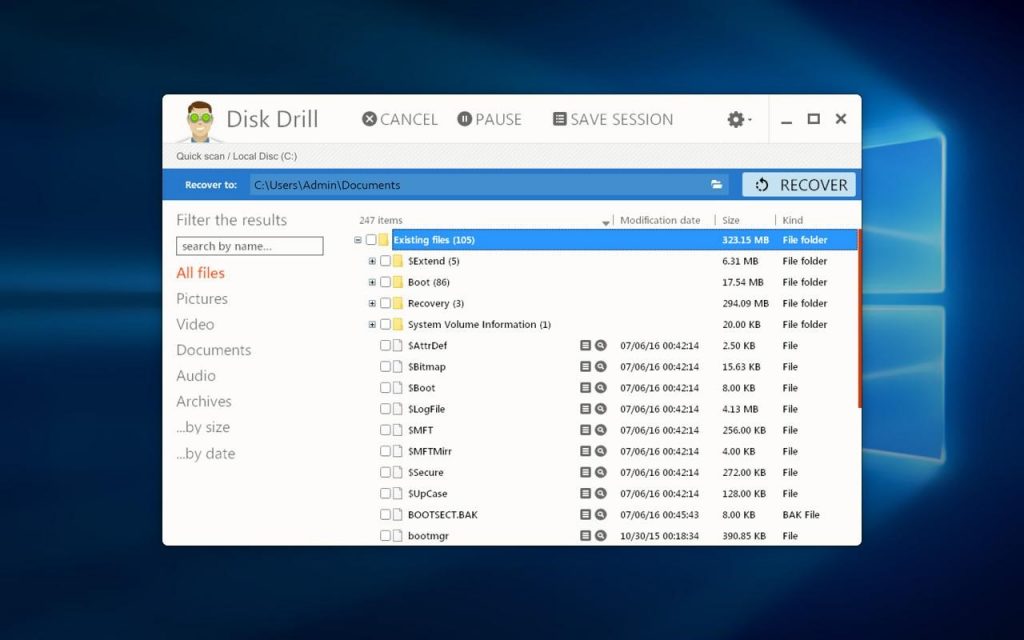
In turn, Disk Drill can help to save deleted files if applying it not only on Windows 10 but a Vista, 7, 8. Then, it offers to restore those files in different formats. If a person deleted a JPG photo, a system may allow to extract it in PNG. And, most importantly, there is no need for training on its mastering. For such requests, a person can understand the procedure by means of a data recovery tutorial for Windows 10.

How to Initiate the Recovery of Data?

First of all, the best data recovery apps should have only a user-friendly interface. Ideally, there are only a few buttons for how to initiate the recovery and how to restore the file. Then, it is necessary to follow the next scheme:

  1. Choose the drive or SD card, and click the “recovery” button. Usually, the software automatically detects the drives that can be scanned, so a user just selects one or a few of them and initiate the scanning. Keep in mind, the scanning may take up to several seconds, minutes, and hours. It all depends on the drive capacity.
  2. Once the scanning is over, there will be a preview of permanently deleted files that can be restored. Here, a person chooses already the recovery methods available.
  3. Recover files.

Besides, the best data recovery software helps to prevent the loss of the data. By installing it, it turns on the features aimed to protect and monitor the files. So, in the case of file removal, a user will easily recover it with its best quality. This rule again does not apply to a free of charge software. But, Disk Drill allows its clients to use it for free up to the first 500MB.

And at last, when choosing the recovery app, get to know its customer support. Even the easiest in usage applications sometime may prompt extra questions or ideas of making them better. And, to protect yourself from losing any of the data, even more, turn to preventative measures such as data backup, or usage of cloud-based drives.

Related

Tags: data recoveryWindowswindows 10
No comments
Share

About Jonathan Adams

Correspondent for Armchair Arcade.

You also might be interested in

Windows 10 on my Surface Pro 3

First Impressions of Windows 10 on a Surface Pro 3

Jul 30, 2015

Me being me, I couldn’t wait for my turn in[...]

Disco Elysium and Paradise Killer games - Generated with AI

IGN Editors’ Choice bundle – $16 for 9 Steam Games!

Nov 3, 2023

Need something certifiably awesome to play? Every game in this new bundle scored a 9 or 10 from IGN, earning them an Editors' Choice award and a spot on your must-play list!

Staxel, a creative farming and village game, is now available

Staxel, a creative farming and village game, is now available

Jan 23, 2018

Here’s the link to purchase the Steam Windows version of[...]

Leave a CommentCancel reply

This site uses Akismet to reduce spam. Learn how your comment data is processed.

Recent Posts

  • FlexiSpot Kana Japanese Joinery Bed review: Beautiful, solid, easy-to-build
  • XREAL 1 Pro+ AR Glasses Launch with 1,200 Nits, AI HDR, and 60 FPS 3D
  • Serafim S3 Universal Mobile Game Controller review: Console gaming on your phone
  • Vari Balance Stool review: An active seat for standing desks and more
  • THEA1200 game list: All 25 games for the modern Commodore Amiga 1200 recreation
  • Maximizing Your Retro Gaming Setup Comfort
  • The Atari 800XL is back with working keyboard, cartridge slot, and more! (plus the full game list!)
  • The origins of Pesapallo and how to play it
  • XREAL Unveils AURA XR Glasses with Android XR and Snapdragon Reality Elite
  • Evercade announces The Last Ninja and IK Collection, plus James Pond Collection (and updated master game list!)

Recent Comments

  • Bill Loguidice on Official Game List for My Arcade Atari Gamestation Pro
  • M.Atorban on Official Game List for My Arcade Atari Gamestation Pro
  • Post SMTP on 5 Marketing Must-Haves for Digital Businesses
  • Bill Loguidice on Review: MX Plus Android TV Box
  • Jacqueline Doucet on Review: MX Plus Android TV Box
  • erichagmann on Why More People Are Exploring Digital Gaming from Home
  • Bill Loguidice on Review: Atari Flashback 7 (AtGames, 2016 version) (includes videos)
  • Caleb.B on Review: Atari Flashback 7 (AtGames, 2016 version) (includes videos)
  • Emma on Should You Be Focusing More On Local Marketing?
  • Sharon Hill on Never before seen Hulk Hogan and Andre the Giant WWF photos from 1981!

Archives

Categories

Explore

android (49) apple (37) ar (42) Arcade (177) Atari (79) atgames (173) augmented reality (35) book (99) books (98) casino (591) esports (52) firmware (43) Flashback (45) gambling (614) Gaming (45) home arcade (116) htc vive (42) humble bundle (282) humble store (67) ios (38) led (35) legends (40) legends arcade family (46) legends pinball (39) legends ultimate (71) Microsoft (44) Nintendo (81) PC (35) pc gamer (68) pc gaming (53) pinball (43) playstation (61) PS4 (37) Sega (41) slots (94) sony (57) steam (148) switch (37) technology (37) update (42) virtual pinball (36) virtual reality (118) viveport (42) vr (124) Xbox (35)

Affiliates

+ Amazon

The everything store

+ Loaded (Formerly CDKeys)

Digital Games for PC and Console on Sale!

+ Castlemania Games

Retro and modern video game store! Use coupon code BILLLOGUIDICE for 10% off!

+ ACEMAGIC

Amazing PC, mini PC, and laptop deals

+ Planet Fitness

$1 down, no contract, great gyms everywhere!

+ Humble Bundle

Game deals, including name your price bundles

+ Playasia (Play-Asia.com)

Import games and collectibles

+ DJI Store

Amazing drones and related technology

+ Razer

Amazing PC gamer products!

+ Microsoft Rewards

Earn and redeem points

+ Atari

Retro and new hardware, software, and merch

+ LiberNovo

Dynamic, ergonomic office chair

+ The Moddern Castle

Professional video game console restoration and modernization products

+ GearUP

Reduce ping for all games on any device

+ Enphase Energy

$100 gift card for solar or solar storage system

+ Fortnite Support-A-Creator Code

Enter armchairarcade

fullSTEAMahead365 Your total news and information resource for all things Science, Technology, Engineering / Mathematics, Art, and Medicine / Health.

Human Advancement Never Stops.

Key Site Statistics

Posts published: 2,896
Latest publish date: October 17, 2026 @ 2:53 pm
Registered user count: 99,026

Contact Us

If you have a question, would like to provide feedback, or otherwise wish to get in touch with us, use this form.

Send Message

Blog Posts by Date

October 2019
MTWTFSS
 123456
78910111213
14151617181920
21222324252627
28293031 
« Sep   Nov »

Support Armchair Arcade

All editorial content © 2003 - 2026 Armchair Arcade, Inc., an Armchair Creative Services, LLC, property. All rights reserved unless otherwise indicated. All trademarks and copyrights are retained by their respective owners. No content is to be removed or reused from the Armchair Arcade Website for commercial purposes without explicit permission from the principal Armchair Arcade staff, or the original trademark or copyright holders. Armchair Arcade, Inc., is not responsible for the content of any external sources or links. Further, endorsement of any external sources or links is neither implied nor suggested.

We thank you for your support and encourage you to contact us for any reason, including, but not limited to, questions, concerns, business endeavors, or praise. Especially praise.

Armchair Creative Services, LLC, may earn compensation for sales from links on posts through affiliate and other programs. Editorial rigor and objectivity standards are strictly adhered to and any compensation has no effect on coverage or opinions.

Prev Next